
Before you begin: Read the updates at the bottom of the page. This post was written for an older version of the YUI library.
I’ve had nothing but good things to say about the Yahoo User Interface tools. It seems to me like the developers continually add all the things from other libraries that I like into one simple to use, well documented, overall good quality library.
The new addition of the rich text editor has left me no less pleased. I can now ditch the other editors I’ve used in the past in favor of one that will be maintained. (I’ve tried two that worked, but were becoming out-dated and didn’t really have support.)
Yahoo’s RTE has a great dialog for modifying images. You can’t use it to upload images from your computer however. So far, every situation I’ve needed an RTE has called for the ability to add images from the users hard drive. I’ve created an extension that modifies the RTE image dialog to include a new input for browsing to an image. It uses the Yahoo Connection manager to upload the image in the background to your server, and then displays the image in the RTE after the file is successfully uploaded.
Here is how to use it:
-
Place the required source code dependencies for YUI Editor and YUI Connection Manager in your html.
<!-- Skin CSS file -->

<link rel="stylesheet" type="text/css" href="http://yui.yahooapis.com/2.3.1/build/assets/skins/sam/skin.css">

<!-- Utility Dependencies -->

<script type="text/javascript" src="http://yui.yahooapis.com/2.3.1/build/yahoo-dom-event/yahoo-dom-event.js"></script>

<script type="text/javascript" src="http://yui.yahooapis.com/2.3.1/build/element/element-beta-min.js"></script>

<!-- Needed for Menus, Buttons and Overlays used in the Toolbar -->

<script src="http://yui.yahooapis.com/2.3.1/build/container/container_core-min.js"></script>

<script src="http://yui.yahooapis.com/2.3.1/build/menu/menu-min.js"></script>

<script src="http://yui.yahooapis.com/2.3.1/build/button/button-beta-min.js"></script>

<!-- Source file for Rich Text Editor-->

<script src="http://yui.yahooapis.com/2.3.1/build/editor/editor-beta-min.js"></script>

<!-- Source for Connection Manager (Required for yuiImageUploader) -->

<script src="http://yui.yahooapis.com/2.3.1/build/connection/connection-min.js"></script>
- Download the yuiImageUploader Source and add it to your included javascript dependencies
<script src="/yui-image-uploader.js"></script>
- Instantiate your editor the same as you normally do. Then modify it with the yuiImageUploader function. The parameters for the function are the editor instance, the url to upload the file to, and the parameter name that the file will be uploaded with.
var myEditor=new YAHOO.widget.Editor('rte_div',cfg);

yuiImgUploader(myEditor, '/upload_url','param_name');

myEditor.render();
-
Implement your upload handler on your server. I’m assuming if you’re looking for this functionality, you already know how to do this. The important thing is the response. The content of the response is a JSON object. You must return a response with the Content-Type header set to ‘text/html’ however, because IE will attempt to open the response in a new window if the Content-Type header is something other than ‘text/html’. Your object needs to have a status and an image_url variable. For a successful response, just return:
{status:'UPLOADED',image_url:'/the/url/of/the/image'}
For a failure, modify the status variable to be an error message that can be shown to the user:
{status:'The image was too big.'} - When your users click on the image button on the RTE editor, the yuiImageUploader modifies the image dialog to have an additional file field for uploading an image:
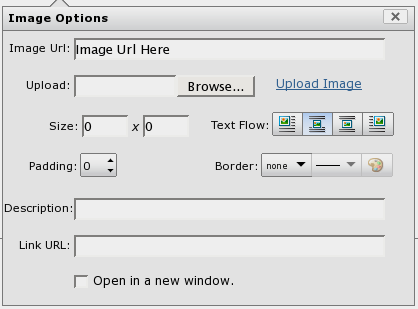
The upload is done in the background with the Connect object provided by Yahoo’s Connection Manager. If everything works ok, the URL returned by the server is placed in the image url input and the image is shown in the editor.
That’s it. You can download the file here.
Enjoy.
Update:
I’ve created another post that shows a working example here.
Update:
I’ve added another example, this time with the server side script being implemented in PHP.
Update 10/31/08:
Thanks to bkinsey for providing updates to the client script for use with YUI 2.6. You can see his comment below or I’ve added downloadable file here.
Update 11/6/08:
I corrected errors in the script and added a working YUI 2.6 Image Uploader example.
Update 02/16/09:
Vijay Oruganty has provided a Java upload handler for the YUI image uploader.
Update 07/01/09:
I’ve added a working example with the 2.6 uploader and YUI 2.7. YUI 2.7 Image Uploader
Update 06/16/10:
Working example with YUI 2.8.1 added. Tagged the uploader git repository tag_v2.8.1. YUI 2.8.1 Image Uploader


Perhaps yui-image-uploader needs updated again to work with 2.7.
Dennis,
Ok, I found the problem i was having: I was passing back a relative URL, and Editor was doing a GET relative to my current CodeIgniter pretty URL, rather than relative to my site URL. So it was doing at GET for:
http://mysite.com/controller/method/uploads/1234.jpg
but the image was at
http://mysite.com/uploads/1234.jpg
In this case what I was returning was “uploads/1234.jpg”.
The confusing thing was that the img tag that got inserted into the text actually worked – I would see the image when I pulled the text out of the database and displayed it because the src was “uploads/1234.jpg” and is found by the browser. But I couldn’t see the image inside Editor at all.
So now, I return a full URL (http://mysite.com/uploads/1234.jpg) and all is well.
BTW, class=”yui-img” started showing up in img tags once Editor could find the image.
Thanks for your excellent addition to YUI Editor!
Hi all,
I’ve been using the uploader script 2.6 with YUI 2.7 RTE without any problem. Just add the uploader js and initiate the image uploader.
Most of the problems are due to folder / permission issues. Please make sure that your rte / uploader form location and the uploaded image folder are sync with each other. If it’s in a different folder, make sure you have the correct path for the folders from your uploader & also server side PHP file.
hi
i am using 2.6 image uploader.when i select image automatically image is uploaded to my folder .and target is inserted to iframe.i am using this in google opensocial in ning container.My problem is i am unable to get the response .but my image is uploaded to folder.
in connection.js file
in asyncRequest function
try
{
// responseText and responseXML will be populated with the same data from the iframe.
// Since the HTTP headers cannot be read from the iframe
obj.responseText = io.contentWindow.document.body?io.contentWindow.document.body.innerHTML:io.contentWindow.document.documentElement.textContent;
obj.responseXML = io.contentWindow.document.XMLDocument?io.contentWindow.document.XMLDocument:io.contentWindow.document;
}
catch(e)
{
alert(e.message);
}
in below catch block i am getting alert like “Permission denied to get property Window.document”
can any one tell me what causes this error.
this is very urgent for me.
please help me out
thanks
sekhar
Have you debugged this problem with Firebug in Firefox? Also, you might try enabling the YUI logger and adding additional logging statements. Looks like a browser issue to me.
how can i enable the yui logging .this is very urgent for me.can u give me the solution.
Probably the best thing is to join the YUI forums and give more context for your problem. Also, the YUI site has a page that shows everything you need to know about logging.
Anyone using YUI 2.6.0 should be aware of this lovely little bug : http://yuilibrary.com/projects/yui2/ticket/2151060.
In Firefox (3 for sure, maybe 2) : If you select a previously inserted image and click the “Insert Image” button it will remove the existing image from the editor and bring up the “Insert new image” dialog rather than the “Edit existing image” dialog.
It was fixed but you have to update to 2.7.0 and hope that nothing else breaks.
Thank you for your examples Dennis, they have proved very helpful.
Hi there,
I am using this image upload extension and have it almost complete, however I noticed that when I select the image from my file browser the URL does not appear in the Image URL box and the image does not appear in the editor.
I was adding alerts throughout the code and it seems that it cannot find the FORM element that is the parent of the “Upload” label that is added. Where is the HTML for this FORM created as when it executes the line:
Dom.getAncestorByTagName(img_elem, ‘form’).encoding = ‘multipart/form-data’;
it seems to find some other FORM on my page that is completely unrelated to this pop up image browser.
Cheers
Chris
@Peter. I just added the 2.7 example. So far, I haven’t found anything else that breaks.
@Chris: You ever fix this?
thanks alot for the recipee,,,,,,,,,,kenya
Hi there.
I wonder if you could shed some light on an issue I’m experiencing.
I’ve written & implemented an extension to integrate the YUI RTE & Image Upload extension into ExpressionEngine 1.6.7 everything seems to work other than the actual upload. After selecting an image from the file browser I get the following JS error:
this._formNode.submit is not a function
If I take everthing out of the EE environment it works, so I’m assuming I have some kind of conflict. As far as I know there are no other JS libraries loaded. As I have almost no experience with the YUI I was wondering if you might be able to point me in the right direction, I appreciate that the issue probably lies within EE but I don’t even have a clue how I might work around it.
Regards
Firefox w/ Firebug installed is your friend. Make sure the framework is including all the correct YUI headers. Do you have additional HTML on the page that may be conflicting? Enable the YUI logging console too.
== Image uploads failing in IE7 ==
Just solved this after banging my head against it for a while (ahh, the joys of web development!).
If the “name” attribute of the form that contains the used by the YUI Rich Text Area is set to “action” then the image upload script fails in IE7.
For some reason it makes an ajax call to the page containing the form rather than the server-side script designed to handle the image upload. Changing the “name” attribute to something else (such as “save”) resolves the issue.
Hope this helps someone else in the unlikely event that they have the same problem.
Cheers,
Pingback: An Example Rich Text Editor Image Upload with PHP | All My Brain
Pingback: Image Upload with YUI Editor 2.5.0 | All My Brain
I’m looking for a multi-OEM product offering but within a single catalog and preferably through a single web portal – are there any consulting services that offer that? In researching I found this http://global-serve.com/Services/ITProcurement/tabid/180/Default.aspx but not sure if there are bigger consulting firms that can offer this kind of thing?
Does the RTE work with YUI version 2.8.0r4 ?
Pingback: YUI Image Uploader Example with TurboGears | All My Brain
Pingback: YUI Image Uploader for Rich Text Editor 2.8.0r4- Emin KURA
Pingback: YUI Image Uploader works with YUI 2.8.1 | All My Brain
I tried the codes, image is uploaded, but when submit the form only the texts added to the data base.. Please help Urgent..
Thanx.
is there any specific reason, why the pop-up is not working? when i click the upload button on the yui upload button, the default images comes, but not the pop-up for further process..
any of your solution will be helpful..
can any one tel. how to get the values from the editor and have to post the values in my database.hep me
There are several examples of how to do that in multiple different server side languages if you search the YUI examples on this site.
hi i am working on image upload
still my code is not working i dunno were is the mistake
can anyone send me the source code.
yuiImgUploader(myEditor, ‘/wp-content/uploads/2007/12/yui_img_uploader.php’,’image’);explain this line
Hello. This script is beautiful and works perfectly with my backend perl scripts. I have one little problem though. When I upload an image into the RTE followed imediatley by some text ‘foo’ I’m able to retrieve the image and text value through jQuery with no problem. But if I were to reverse it like start off with some text ‘foo’ immediately followed by an uploaded image I’m only able to retrieve the text but not the image value. Any idea as to why? Thnx!
madhan: You need to read the other posts on this blog about backend programming. The line you are having is part of what ties the front end to a back end script.
Juan: You’d probably get your answer better on the YUI forums. I always accessed the content with the YUI api directly.
madhan: I guess I had same troubles today.
There should be 4 args in function in last version of this plugin:
var myEditor=new YAHOO.widget.Editor(‘rte_div’,cfg);
yuiImgUploader(myEditor, ‘editor_name’, ‘/upload_url’,’param_name’);
myEditor.render();
More info I found here: http://allmybrain.com/2010/06/16/yui-image-uploader-works-with-yui-2-8-1/
Whoops, sorry – little mistake. Second arg of yuiImgUploader() should be same with first arg of Editor constructor:
var myEditor=new YAHOO.widget.Editor(‘rte_div’,cfg);
yuiImgUploader(myEditor, ‘rte_div’, ‘/upload_url’,’param_name’);
myEditor.render();
Hello, I was wondering if there is an easy way to strip out some of the options from the image uploader dialogue? I’ve dug around but I can’t seem to locate the piece that you add the “upload” button to.
Thanks
Thanks for the script, but
please whee do add this status message?
{status:’UPLOADED’, image_url:’/somedirectory/filename’}
That message is returned by your script on your server to indicate the upload worked correctly. On the client side you don’t have to do anything. The image appears in the editor.