
As a fan of tracking my finances electronically, I’ve paid attention to GnuCash for quite a while. In the past, it wasn’t ready for my needs since it didn’t automatically import finances from my bank. That has changed though. I was happy to recently successfully download bank transactions with the latest GnuCash and I decided to go ahead and make the switch for good.
There are a few reasons GnuCash is better than a number of proprietary alternatives. GnuCash is Open Source Software and can be downloaded and used without purchasing anything. You don’t have to pay extra to unlock more advanced features. You don’t have to pay anything at all! Speaking of the advanced features, you can track stock prices and investment accounts in addition to normal cash based accounts. Also, GnuCash uses a double entry accounting style that can be used to do your accounting in a GAAP compliant fashion.
Anyway, that brings me to my reason for writing this post. I have been somewhat dissatisfied with the budget tracking abilities of other software. I’ve been using Quicken for years and have found that it’s budget features provide a disincentive for my wife and I to actually continually use them. Here are a few of the problems:
- Budgets don’t accumulate money
Lets say you want to save for a vacation and you’d like to budget $300 a month so that after 6 months you have $1800 to go on your vacation. That works fine if your six months fall within a calendar year. You can run a budget report and see how much money you have in that budget. If you happen to cross years however, you’ll have to create a new budget and initialize it with amounts from your old budget. Suppose you had 4 months saved. You’d have to put your budget for the new year’s January at $1200 and then continue saving $300 for the next couple months. This is not only annoying to do for more than a couple budgets, but it causes your budgeted money for January to exceed your income if you’ve been saving for a while. This is especially the case when part of your budget includes savings that you don’t spend. - Budgets don’t balance
This problem is directly related to the 1st problem. Because you can’t accrue a balance in a budget, you can’t balance your budget with the money you actually have in a savings account. I created a custom report to do this manually but it was never exact.
- Budget balances are difficult to adjust
Suppose you save $50 a month in one budget and $50 in another. After 6 months, you decide that you didn’t need as much money in one account. When do you make the budget adjustment. You can go back and edit every month for the 6 months. You could also make adjustments to a budget all in one month. There isn’t a good way to do it though and unless you adjust it tediously every month to reflect what you need, it’ll mess up your custom reports that you worked hard on.
Anyway, I don’t claim to be an expert at Quicken so you may find my rational unsupported if there are better ways of doing your budget. The point of this however, is that my wife and I didn’t have time to adjust our budget every month. Life doesn’t follow a preset budget. Sometimes you need to make a purchase and use money from savings or another account. We found that every month we wanted to adjust budget values and it was too time consuming.
Getting back on track, we’ve found a much better way to track our budget and are happy with GnuCash. The rest of this post shows how we’ve created budget accounts with GnuCash and how we’ve solved the problems we had with Quicken.
Prerequisites
Install GnuCash. You can get the latest binary distribution here. If you use a Mac, I used the instructions here and it is working for me.
My Budget Philosophy
Here are the basic concepts I want GnuCash to accomplish for me.
- When I earn income, I want to decide which budgets that income will be applied to
- When I spend money, I want to decide which budgets that money comes from.
- I want to be able to see, at any time, how much money any specific budget includes.
- I don’t want to redo my budgets at the start of every month or every year.
- I want to adjust budget balances easily if I decide it is necessary.
That being said, here is how I’ve accomplished this with GnuCash.
Basic Account Setup
GnuCash offers a number of preset accounts you can choose to use when you 1st create a new file. For this example, I’m using the 1st preset “Simple Checking Account”. After you select those accounts and finish the creation wizard, you get an account for a checking account and an opening balance account.
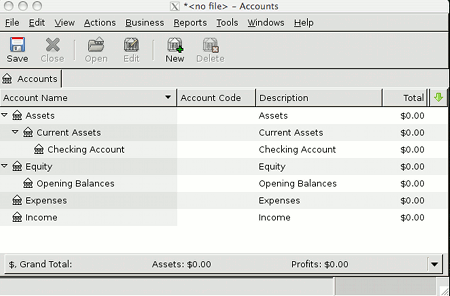
GnuCash Budget Setup
First, a quick accounting refresher. The basic accounting equation is:
Assets = Liabilities + Equity.
GnuCash enforces this concept. Each transaction you enter must be balanced according with that equation.
A budget account is a liability. To better understand this, think of it this way: If you earn $100 and put it in the bank and want to create a budget, you might decide that $50 is for bills, and $50 is to save. So you create a budget account for $50. You haven’t spend the money yet, but you plan on it, and that is why it counts against your assets. The idea is that $50 is reserved to spend and you shouldn’t spend it on something else.
Every transaction must be equally balanced though. If you add money to a liability, you need to find an asset to add to as well so the equation stays balanced. I’ve done this by creating a separate account that I’ve called “Budgeted Cash”. It’s an Asset. You add $50 to a budget, and $50 to budgeted cash.
Here is the account setup:
- Click the “New” button to create new accounts.
- Create a “Budget” placeholder account. This is just to organize all your budget accounts in an easy to see place. It also will sum the sub accounts for you so you can see the total of your budgeted money.
Account name: Budget
Placeholder: checked
Account Type: Liability
Parent Account: New top level account. - Create an asset “Budgeted Cash” account.
Account name: Budgeted Cash
Placeholder: unchecked
Account Type: Cash
Parent Account: Assets - Create a sample food budget account.
Account name: Food
Placeholder: unchecked
Account Type: Liability
Parent Account: Budget - Create a food expense account. This is for when you actually spend the money.
Account name: Food
Placeholder: unchecked
Account Type: Expense
Parent Account: Expenses
I now have accounts set up to track my checking account balance as well as my budget balance. (This creates the basic structure to solve items 3 and 4 from my list above.)

Entering transactions
Lets enter a sample income transaction.
Double click your checking account and we’ll enter a simple income transaction and budget some of the money.

In this example transaction, I’ve only budgeted $50 of the $100 income. My personal preferences is to budget all the money for each income transaction. I have a number of budget accounts for things I need to spend, some for savings, and the remainder for discretionary spending. You can do as you see fit.
The budget transaction doesn’t affect your balance sheet. You still have a net increase of $100 because you deposited $100 into your checking account from Income. The $50 budgeted cash is balanced back to $0 by the food budget. We’ve now accomplished #1 from my list above.
You can see that your account totals include $50 for food now. This is #3 from my list above.
Spend money from your budget
Later on you or your spouse goes grocery shopping and spends $37.50 at some store. Lets enter that into the Food expense account. If you haven’t noticed, you can really use any account to enter transactions. There is even a general ledger for entering transactions for all accounts.
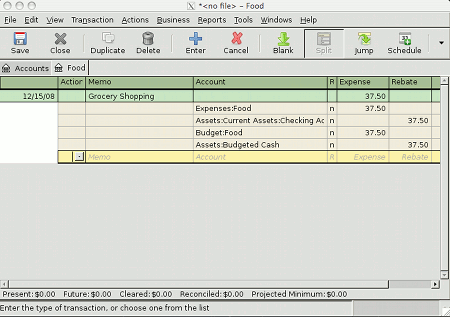
You’ll notice that you have to enter the amounts twice. You show that $37.50 transfers from your checking account to your food expense. You also show that $37.50 transfers from your budgeted cash to your food budget. This may seem somewhat tedious but in my opinion, it is highly beneficial. We’ve just solved #2 from my list. If you are creative, you’ll see that you can do things like use more than one budget to pay for an item. You could also use one budget to pay for more than one item. Suppose you have too much money at the end of the month in your food budget and not enough in your discretionary spending budget that includes going to a movie. Just make a budget transaction that puts money into one budget from the other. Easy enough. #5 solved.
Summary
After entering the data, I see a balance of $12.50 in the food budget. This amount doesn’t role back to 0 like it does with Quicken at the start of the year [1]. I also see that I have $12.50 of budgeted cash. You can subtrack your budgeted cash from your checking account total to determine how much money you are saving. You could also create a savings budget and budget all your income.
Some may find the extra work of entering budget transactions tedious. I’m not going to argue that point. I found however, that my wife and I don’t have time each month to sit down and figure out which values to put into a budget. At the start of the year, we don’t want to completely create a new budget. We do have time to pay our bills and record our transactions though. The time it takes to enter the extra budget accounts each time you record a transaction, at least for use, allows us to completely skip the problems we had with Quicken.
Feel free to leave a comment or ask a question.
[1] (Just to be fair, GnuCash also has a budget utility and it pretty much has the same problems that Quicken’s has. On the other hand, I don’t know if you can do this type of budgeting with Quicken and even if you can, Quicken cost’s money!)


Great writeup – I’ve been using GnuCash for years, but I’ve never really used it for budgeting –just tracking what I’ve spent on. I’ve had a few false starts, but I give up after getting stuck on the GnuCash Budget screen (File > New > New Budget). Ever work with that tool?
Thanks! I played with the GnuCash budget tool when I first imported some data. I found it to be pretty similar to Quicken’s Budget tool. It suffers from the same problems really. Suppose you allocate $50/month for savings and you don’t spend that money. You can indeed see that you didn’t spend the money, but there isn’t a good way to see how much you have in your savings budget. I’m not an expert though, perhaps someone has a better way of doing it. I’m not an accountant either! 🙂
Excellent writeup, thanks. I have toyed with doing something like this in the past but hadn’t put forth the mental energy to figure it all out. I thought it would be more complicated than it ended up being for you (and maybe I would have made it more complicated ;-), so I’m glad to see a system that could work well for us.
Thanks. I’m still considering a couple tweaks that could possibly be made. For instance, should budget accounts count as a liability on your balance sheet? Perhaps the budgeted cash account shouldn’t count as an asset since it’s total is already in the checking account. These are more accounting issues than budget issues. I think the general setup will work fine for those who simply want to try and adhere more strictly to a budget though.
My wife and I have been budgeting our money for over 10 years now. Last year, I switched to gnucash from MS Money for the simplicity of double-entry and Linux compatibility.
When I used MSM, I would “split” each income transaction (as suggested in the article) between all of our budgeted accounts and in essence try to get each budget account to reach zero at the end of the month. I did this with a scheduled transaction that split two “paycheck” transactions into the budgeted amounts at the beginning of each month, one for me and one for my wife.
This seemed like the “purist” way of doing double-entry budgeting (which I forced MSM to do, much against it’s intended design), however, the challenge was trying get each account to balance at the end of month created all of these “correction” transfers that got confusing when I ran reports in MSM. I guess I could have gone back and adjusted the transfer transaction as well. Either way, I am not sure that balancing these accounts actually helped us keep on budget and was worth the time.
I am rather impressed with the elegantly simple budget mode in gnucash and have been using it to get the “big picture” of our spending. v2.2.8 now adds the option of a difference column in the budget report.
Even after 10 years of “electronic budgeting” I am not sure that anything beyond the simplest tracking & reporting to looking at spending trends over time actually is worth the time effort invested. Still gnucash is flexible and simple enough to let you try all kinds of tracking and budgeting methods.
Thanks for the article (and posts I just read in the GC mailing list archive). I also tried the gnucash in-built budgeting and couldn’t get it to do what I wanted. I also have my reserved cash in separate accounts (especially for long-term budgeted items). I see the extra work in your “quadruple entry” system, but my current system of using a separate excel file to budget also requires the extra effort.
My budget is monthly, even though I get paid in dribs and drabs as a freelancer. I want my budget items to remain relatively constant even though my income fluctuated, so I think I will look into setting up scheduled transactions to allocate my predetermined budgets amounts at the start of the month. I would then just need to check that I have enough in my various savings accounts to cover my budgeted cash.
I will definitely give you system a go. Thanks
I do exactly what you just said, have a scheduled transaction that allocates my monthly paycheck as I’d like it budgeted, and then I allocate any money I get on the side manually when I get it. I love always having an exact figure for what each budget account holds and I also love having the audit trail of where the budget money came from and went.
Thanks Dennis, I’m very happy with the way you do it.
Though I do agree with Nick in the sense that always having to “split transactions” can be quite a pain, but still, this is a much better method compared to how I did it before!
@Nick: I’d love to know how you use the budget mode of gnucash. I haven’t quite figured it out yet… does it sum things up just like Dennis’s method?
The thing I love about Dennis’s method is that it lets me know how much budget I have left for each category of spending.
Thanks Rafferty,
I’ve been doing this for about 4 months now, and I’ve still loving it. Most of the work of the split transactions can be avoided by using scheduled transactions. The rest of the time, I don’t find it too much more work to enter which budget the money came from. Having an always up-to-date budget is working out very well for us.
Hi Dennis,
I revamped my accounts configuration according to your post and I’m loving it!
Just a short question, what “Report” features do you find useful for this budgeting method? What do you do to answer the following questions:
1. How much did I spend for this month?
2. Did I go over the budget this month?
3. How much did I spend on food and transportation this month?
4. How much was my net-income for the last quarter?
5. Which area can I spend less and save more?
Since you’ve been using this tool and method for quite a long time, you probably asked these questions as well 🙂
*this can be a topic for another blog post :)*
Here you go! http://allmybrain.com/2009/04/08/gnucash-budget-followup/
I found your great post while searching for a better way of budgeting.
This post made me think… What if I open a sub-account of my assets account, for each budget item? I’d have:
Assets
… Checking
……..Food
……..Car
…….. etc
Aftr registering the income to checking, I’d do many transfers from Checking to each sub-account as per budget.
Then, I would register each expense against the corresponding subaccount(s).
This wouldn’t change the balance either (as the budget accounts are checking’s sub-accounts) and I think every item of your requirements would be fulfilled.
What do you think?
Many people _do_ do their budget exactly as you just said. It’s a good alternative to what I do. My reason for not doing subaccount of my checking is that My budget tracks all the money I spend, not just money I spend from my checking account. Whether we spend money on a credit card, out of checking, or with some cash from our wallet, I make the appropriate change to the appropriate budget. Transfers between checking/credit card etc don’t count toward a budget.
i.e., where we put the money isn’t important, where we spend money is.
Couldn’t have asked for a better illustration of using gnucash to start budgeting my expenses than now. Thank you for having spent time writing this article However as a first timer to GnuCash or any GAAP compliant software for that matter (used to record expenses only with Buddi) I’m not totally following the first transaction you have illustrated where in you transfer $50 to your food budget. I figured you used the Split transaction feature but here’s the thing i wanted to try.
1. I am planning to learn to budget my entire income under 50% needs, 30% wants and 20% savings…just to keep things simple and flexible.
2. on creating the transaction as per the screenshot, if i show initial deposit in my savings account as $100 and also $100 in budgeted cash. The accounts page tells me my total assets are $200. it is confusing me. How and why is it showing double amount and in the GnuCash version i’m using…2.28 the assets and liabilities group up separately and not in the fashion you have illustrated. I dunno if as a total newbie to understanding and controlling personal finances I’d be welcome to ask such silly questions but its been few years since my last accounting class. 🙂 This one post is finally giving me a good reason to start using the huge gnucash. I hope I make good use of this open source tool.
I’ve changed my own setup to have my budgeted cash account as one of the sub-accounts under budget. This way, it doesn’t matter if budget is a liability or an asset, it’s just an account and should always have a net 0 balance.
Budget: (0)
->Budget1 50
->Budget2 25
->Budgeted Cash -75
Of course, you can stick the accounts wherever you want, but like you said, it can effect reporting depending on where you put them. This is the way that I think I like it best.
replied in 4 minutes!! must be the hot topic still.
Thanks Dennis. Will try this out soon. 🙂
Thanks for these tips. I started out budgeting using spending categories or “envelopes” as you describe above, and I am moving to GnuCash from a spreadsheet, so I was happy to find this. The previous post will help with my question about total assets at the top of the Accounts screen being doubled. I’m still not sure how to handle credit card transactions. Currently I have a sub-account under Budget for my credit card entries, but how does that work with the documented GnuCash method of putting transactions in an Expense account? I’m not sure how all this trickles down to report expenses on the credit card.
Hi Dennis
I like your approach. (I really hate the built-in budget in GC.) How do you avoid that your Budget accounts affecting totals in the standard reports?
/Peter
I use a sub-account, under budgets, that is basically a contra account. Everything that goes a budget account is transferred from the “budgeted cash” contra account. The total budget balance is always 0. I’ve been using this for over a year now and I like it a lot. It has it’s quirks but I think those are documented pretty well in the posts.
Hi Dennis.
My budget is working now 🙂
The key was to use liability-accounts for ALL Budget-accounts.
Now I just have to convince “mrs peswe” about the benefits of using “quad entry” instead oh double entry accounting. I can definitely see the benefits…
Thanks again for sharing your ideas
/ Peter
When you say “In the past, it wasn’t ready for my needs since it didn’t automatically import finances from my bank. That has changed though.” do you mean that in the past there were problems importing .qif/.qfx/.ofx files that you downloaded yourself and at the time you wrote this those had been resolved, or is there a way to connect to your bank account through GnuCash to automatically grab new transactions without having to download and import those files manually?
I tried tracking my finances with GnuCash about a year ago and at the time it would barf on the .ofx/.qfx files that I got from my investment accounts but it did ok with checking/savings accounts.
Between the investment account problems and having to import transactions manually I eventually gave up.
I have played with the new version (2.3.7) and the problems with the investment accounts seem to be resolved, so I’m ready to give it another whirl, this time with an emphasis on budgeting rather than just tracking what’s going on.
But if there’s a way to make it easier to get the transactions into GnuCash in the first place that would make me more likely to stick with it this time.
Thanks for the great write up 🙂
I’m downloading ofx data automatically withing GnuCash for my bank and a couple credit cards. It uses AqBanking under the hood. It isn’t perfect, but it’s good enough that I don’t have to log into the bank and download the data manually, and then import it. I’m still using 2.2.9 and decided to not try any 2.3.x series, but to wait until 2.4 is released. I’m afraid that the current import support will probably only get worse since in the USA, banks are starting to go to a multi-level authentication system and it seems Quicken has pretty much a monopoly on the protocol specs.
Thank you!! A light just went on in a way that it never did with Quicken (which I’ve been using since version 3 for DOS)
Another huge benefit of this system (that can’t be replicated with any other system that I’m aware of) – your budget accounts don’t have to mirror your expense accounts. Take a $1000 house payment, for example. From an expense perspective, I want to track the $100 principal (txfr to the Liabilities:Loans:Mortgage acct) and the $900 interest (txfr to the Expenses:Interest:Mortgage Interest acct). From a budget perspective, however, I only care about the $1000 total that will be spent this month (txfr to the Budget:Housing budget account).
This makes it possible to track my expenses at a different level of detail than my budget – something I’ve been wanting to do for years.
Another benefit if you’re doing zero-based budgeting (where “every dollar has a name”) – you can very easily compare your Budget:Budgeted Cash total to your Assets:Current Accounts (bank accounts + cash on hand) total – they should always match if you’re doing it right.
Pingback: GnuCash Budget Followup | All My Brain
Thanks for the detailed review of GnuCash.
Thanks for posting this. I agree with all of your budget philosophy points. However, I’m confused on how to adopt the example accounts for use with credit cards.
When I buy food, I pay for it with a credit card (get cash back, provides more security over real money, etc…). What would this type of transaction look like? Without a budget, I would have a payment to my expense food account and a charge to the credit account. Later when I pay my credit card bill, I would have a payment to the credit account and a charge to the checking account.
I’m unsure how to work in the budget transactions. I still have the money in my checking account after I make the food purchase through the credit card, but I want to remove the amount from the food budget.
Can you help me? I’m not great when it comes to understanding finances.
We do this all the time. (Pay for things with credit cards)
The credit card transaction looks like this:
expense: Amount
Card: Amount
budget: Amount
budgeded cash: Amount
Later when I pay the card, that is just a transfer of money and no budget account is used:
card: Amount
bank account Amount
We always keep the budget tied to actual things we buy and then later when we are paying cards off or transferring money between accounts, those transactions don’t affect the budget.
Check home page for updated article!
OK. I’ve been wanting to do an envelope system AND use GNUCASH. So I’m excited to have found this article! So after staring at this for about a year. I finally get it. These last three weeks I’ve delved 100% into this, and I think i have everything entered, accounted, and reconciled for since Jan. Per your your 5/21/2009 comment, I have my budgetcash and budget:food accoutns under a parent “budget”
But I can’t get my head wrapped around this:
You have Budgeted Cash as an asset and Budget:food as a liability. In your “goals” you state:
“1) When I earn income, I want to decide which budgets that income will be applied to
2) When I spend money, I want to decide which budgets that money comes from.
3) I want to be able to see, at any time, how much money any specific budget includes.”
The account “budget:food” screams “an envelope with cash to be spent for food” So I’m thinking I like budget:food should be an asset. and budgetcash should be the liability. so when I see the account summary, I’ll see positive “money leftover” in the food envelope if I have money I can still spend
So when I get income, I’d divvy up the money to the different envelopes, and when the money is spent, it get’s put into the “budgetcash” (which I would probalby name “cashspent” or something.) I realize I just created a boatload of work, but to me this makes more sense.
I guess What I’m saying is I’d rather see “black” or positive numbers in my envelope and “red/negative” numbers in my “budgetcash” account.
is there a way to do that?
Thoughts? I look forward to your response. And thank you for your article! It’s a life saver.
huh. In your “updated” article, you actually did change the budget;food accounts into assets. except the only difference I see, is that you put your envelopes under your checking account. Where as, I’m keeping mine still separate.
or maybe I should just ask: what is your “preferences->accounts->reverse balanced accounts” setting?
@laura: I had been posting on the other topic but thought I’d come see if any action was over on this one.
I would keep the reverse balance accounts on credit accounts. It doesn’t hurt to go play with that setting to see what it gives you. If you really want that budgetcash red then put it into an account that would show it that way once you get that setting the way you want it. Like just make it a
I see it as credit accounts are ones that you are trying to get to zero and expenses just keep on going. So the red is a bummer to see there! 🙂
But it has been quite a few months since that last post. How is it going? Any thoughts on it all?
Well, it’s like this. Gnucash is great for lots of things. I still use it for invoicing and keeping track of some contract stuff. But when it comes to using a program that is easy… not so much.
I finally found a program that is easy to do your budget, does envelope budgeting, easy to keep up to date (has iOS and Android apps). Even my wife can use it!
Check out YNAB. It isn’t free or open source like GnuCash but we’ve been using it for quite a while and I can’t see myself switching 🙂 You can try it for free.
Use this link to get $6 off the price if you decide to purchase 😉
http://go.referralcandy.com/recommend/K9W2T2M
I’m curious… why make a separate budget account? I have been using GNU cash for quite a while, and what I did was just make sub accounts in my checking account. So under my checking account, I have the food budget and the clothing budget, etc. When I make a deposit, I divide it up into the sub accounts right away, and the total shows in the checking. When I want to reconcile my checking account, I click on the checking account and include sub accounts in the reconciliation. This way I don’t have to make 4 entries for every transaction, just two.
I have been using an excel sheet to plan what I will put into those different budget sub accounts, and I think I could probably use the budget within GNU cash the same way I use the excel sheet. However, I’m not sure I like how they do it; I can’t get the numbers at the bottom to match what I think I have entered. So I may just leave it alone.
In any case, thank you for pretty much confirming me in the plan I have been using all along. 🙂
Just found this and am in the process of implementing it for myself. I was looking for a way to adapt my spreadsheet system to something that would give me a better record of actual expenses, and I think this will be just the thing. Thanks so much for sharing your work!
Great concept–I’ve implemented this in my GNUCash set up and it’s worked out great for an entire accounting year so far! Because it zeros, it psychologically helps me stay within spending limits.
I extended this concept to two other concepts: budgeted _income_ and long term savings goals. In the first concept, there is “cash to earn” that should match up with “cash to spend”. This helps determine my total monthly budget.
The concept idea looks at savings goals similar to budgeted expenses. I keep them separate for three reasons: I physically separate the money (savings account), I don’t want to habitually tap savings goals cash to accommodate budget over-spending, and third, I can use a future transaction to determine what the goal amount is. Keeping it separate doesn’t skew my monthly budgets.
Thanks again!
There’s an easier way if you’re not interested in tracking expenses for the year (just the month) within GnuCash, and it ties your expenses directly to your budget. Just turn all your expense and savings GnuCash accounts into liabilities. In General Ledger, you then forecast income by depositing into your income accounts, and budget your expenses and savings (liabilities) by withdrawing from them (which posts as a deposit in the actual liability account). Then, as transactions come along in your checking, simply transfer the money to your expense (liability).
The only downside to this is that you would need to do year-end and YTD analyses with a CSV export and some Excel manipulation, but it eliminates the need for quadruple accounting.
The net result is that at the beginning of the month, you have a negative income, and positive (funded) expense accounts. By the end of the month, your income should show 0 (actual – forecasted), as should all of your expense accounts.